
May 28th, 2026
A message to 22Miles customers about what’s new, what’s unified, and why now is the right time to upgrade.
If you’re a 22Miles customer, you already made the right call! You evaluated the market, ran the demos, went through procurement, and chose a platform you trusted to run your screens, your wayfinding, or your video walls. You built something real.
And we’ve been listening. DX Pro™ is the result of that – built on years of customer feedback, designed to make everything easier to manage, and built to reward the trust you’ve placed in us.
This isn’t a new product you have to learn from scratch. It’s everything you’ve been asking for, finally in one place.
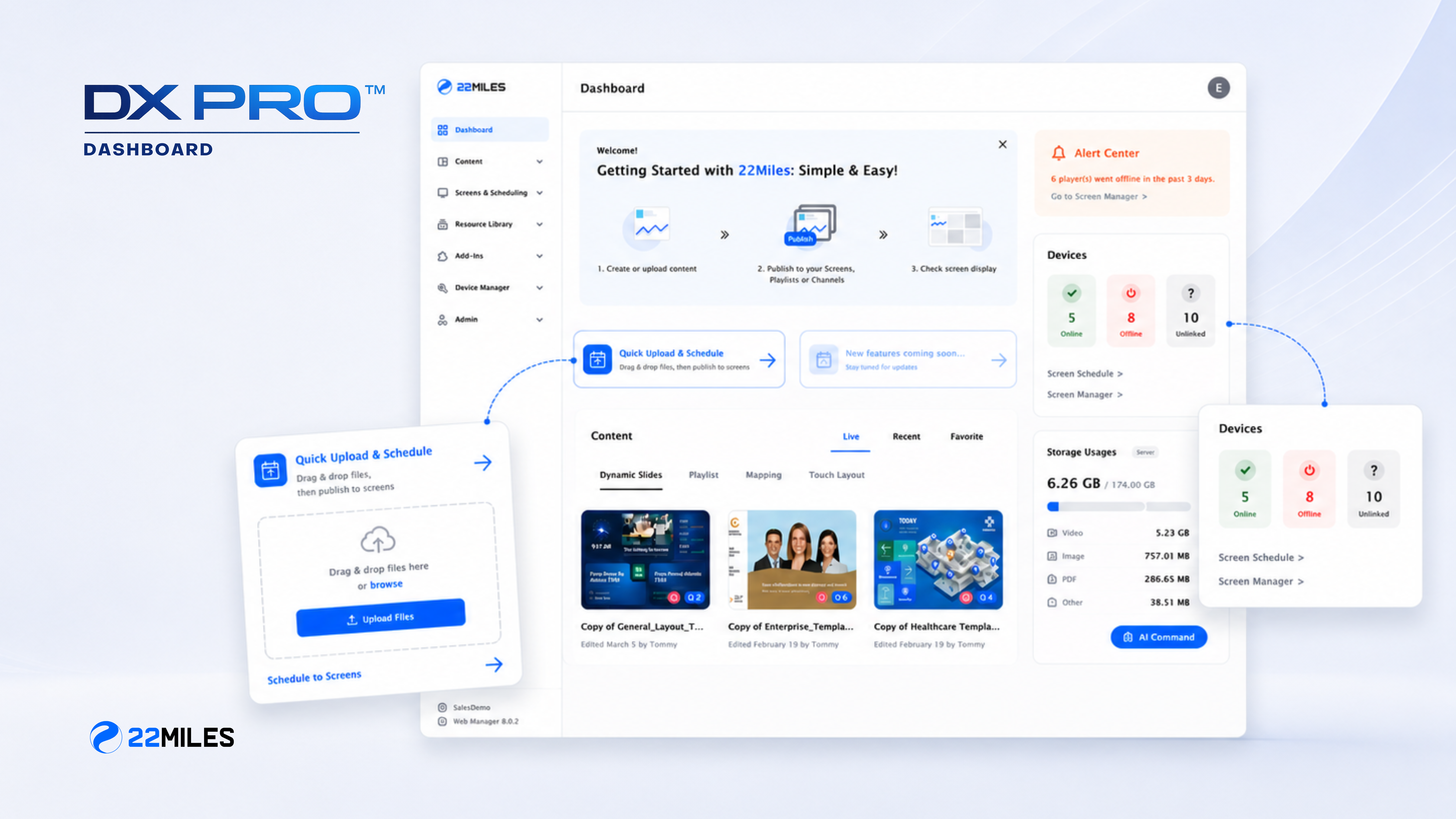
What DX Pro Actually Is
DX Pro™ is 22Miles’ new unified management platform: a single, browser-based interface that brings together everything you’ve been using across content creation, digital signage, dynamic wayfinding, video walls, device management, and governance. One dashboard. One login. Cloud or on-premise, your call.
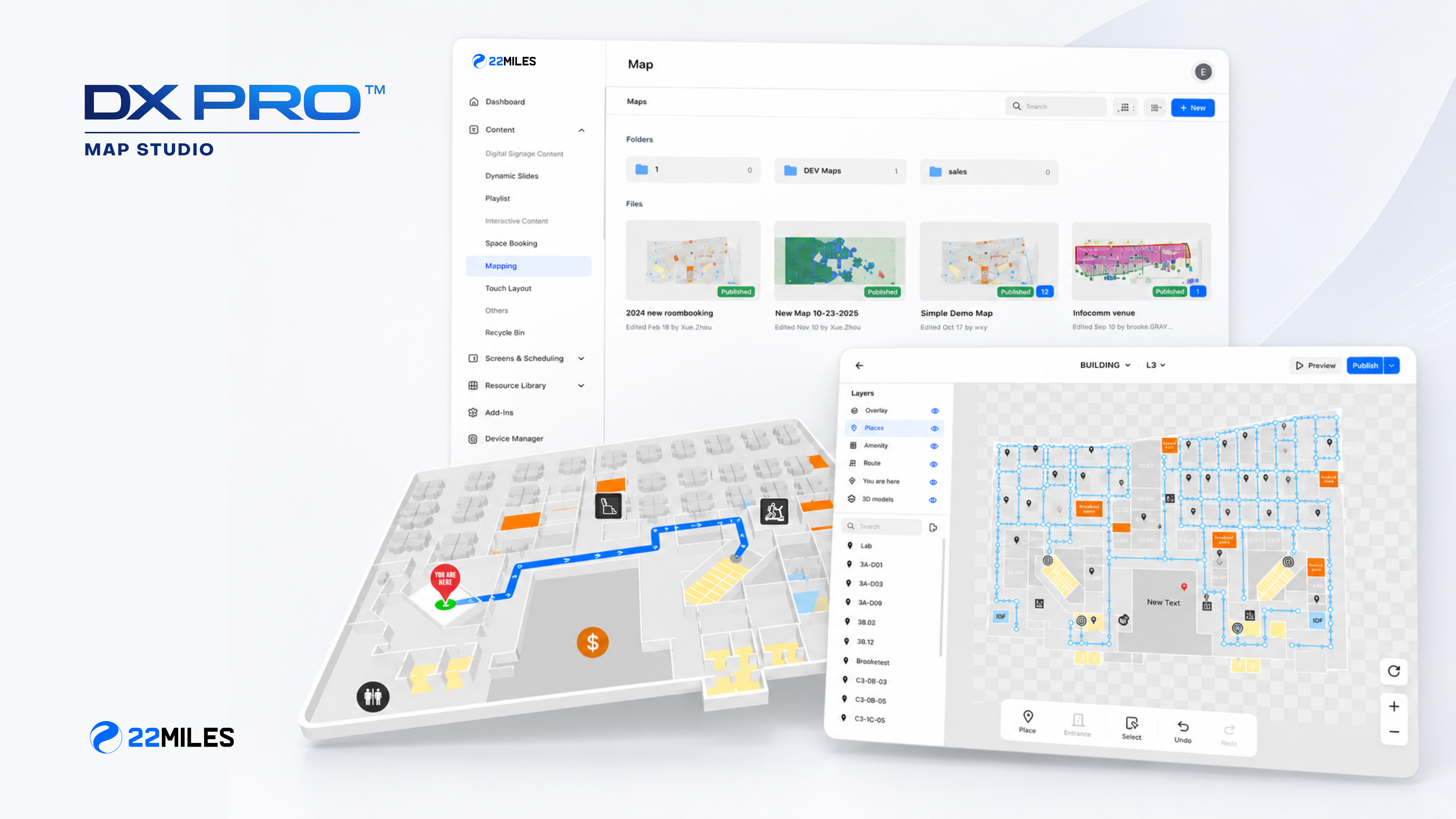
If you’ve been managing your digital signage in Publisher Pro and your wayfinding separately, DX Pro is the version where it all comes together. The move to a fully web-based platform means no local installs, no version mismatches, and no more switching between tools to get a complete picture of your deployment. Everything you already rely on, scheduling, maps, device health, user permissions is now accessible from any browser, anywhere.
The Problem It Solves (That You've Probably Felt)
Most organizations don’t start with a fragmented stack on purpose. It happens over time: one department adds wayfinding, another adds lobby signage, a third adds video walls, and suddenly you’re pulling from multiple dashboards to answer a single question about your screens.
When something breaks, you’re hunting for the right login. When leadership asks for a status report, you’re assembling it from three places. When you need to push an emergency alert to every display in the building, you’re hoping your integrations hold.
DX Pro is built for the enterprise that’s past the proof-of-concept stage and needs a platform that governs at scale.
What Our Customers Are Already Saying About DX Pro
We’ve been rolling DX Pro out with existing customers, and the response has been exactly what we hoped for.
“It looks a lot cleaner, and things definitely seem more streamlined. All the same function, just an improved layout, and I love the visibility on that. The designer stuff I’m pretty geeked about, and those reminders are going to be really helpful, especially as we train up new people. More direct access, more visibility. I’m super excited about it.”
— Enterprise Medical Device Customer
Our Customer Success team has been hearing this consistently across the board.
“The feedback we’re getting from customers making the switch has been overwhelmingly positive. What stands out most is how quickly their teams get comfortable. They recognize everything they already know, but it just works better. That’s exactly what we set out to deliver.”
— Brooke Graves, Customer Success Manager, 22Miles
What's New in DX Pro
A Unified, Web-Based Management Interface
Every capability you already rely on, signage scheduling, wayfinding maps, device monitoring, and user permissions, now lives in a single browser-based dashboard. No installs, no toggling between tools, no separate logins for signage and wayfinding.
AI Template Designer
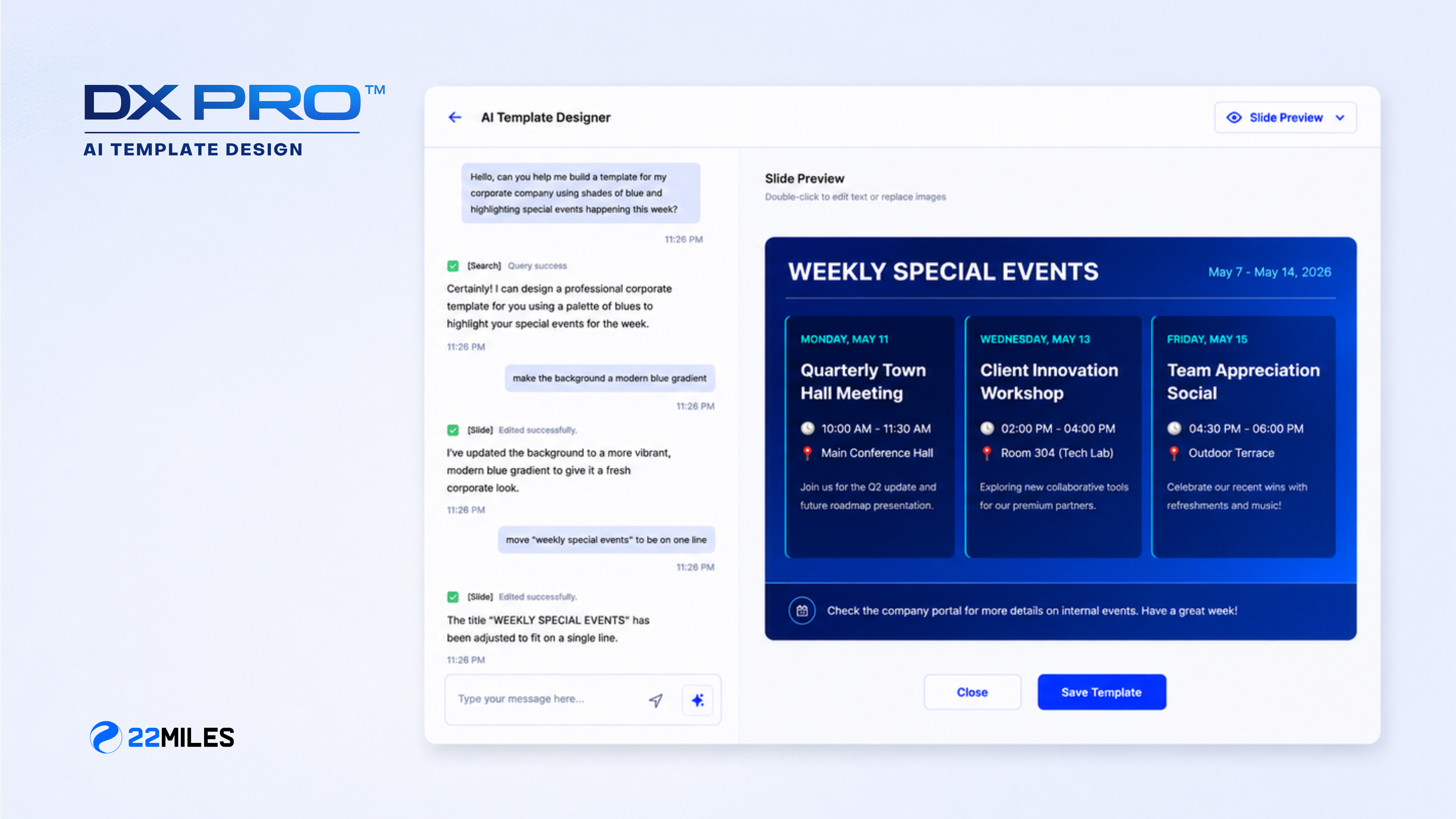
Generate production-ready signage content from plain-language prompts, with full editorial control over every element. You don’t need a design team to keep your screens current and on-brand.
AI Map File Creation
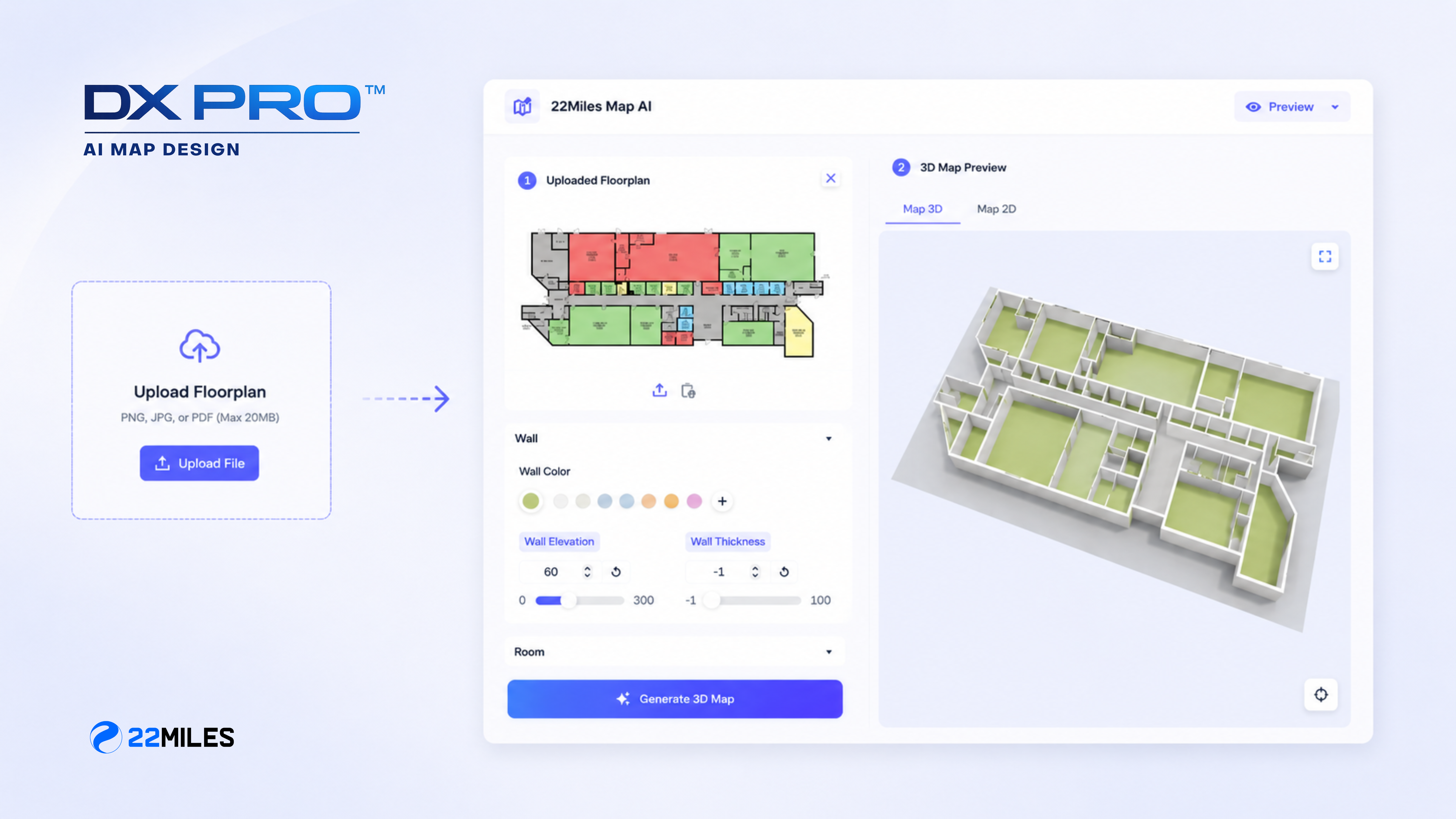
Upload a standard floor plan and get an editable SVG wayfinding map in return. What used to take specialist time and multiple handoffs now takes minutes. Plus, your team can manage it directly.
Fleet-Wide Visibility
The new Alert Center and Device Overview provide you with an at-a-glance view of player health across every location, along with direct links to individual screen managers. Self-service license management, remote updates, and offline alerts mean your team handles more without opening a support ticket.
Network-Wide Emergency Overwrite
Push an alert to every screen in your organization instantly, triggered manually or integrated directly with your existing enterprise emergency notification system.
Expanded Enterprise Integrations
DX Pro ships with native integration for Microsoft Places, Zoom Enterprise, Microsoft Teams, Outlook Space Finder, SharePoint, Office 365, Google Workspace, and major social media platforms, designed to fit into the stack you already run.
Cloud or On-Premise (Your Choice)
This isn’t new for 22Miles, but it’s worth naming: DX Pro runs in both environments, with the same features in either. For customers in government, healthcare, or any environment where data sovereignty is non-negotiable, dedicated on-premise government SKUs with monthly cyber patching support are available.
The Integration Story Is Bigger Than It Looks
The enterprise integrations in DX Pro aren’t just a feature list; they’re a fundamental shift in how your visual communications infrastructure connects to the rest of your organization.
“When your digital signage and wayfinding are natively connected to Microsoft Teams and Microsoft Places, something changes. Your screens stop being a separate system that someone has to remember to update; they become a live extension of how your organization already communicates. A room booking in Teams reflects on the display outside the door. A workplace alert in Places reaches every screen in the building. That’s not an integration. That’s one platform.”
— Tomer Mann, Chief Revenue Officer, 22Miles
Why We Built It This Way
DX Pro didn’t happen because the market moved. It happened because our customers told us, clearly and consistently, what they needed next.
“Every design decision in DX Pro came back to the same question: does this make it faster and easier for a real person to do their job? We looked at how customers were actually using the platform, where they got stuck, what took too many steps, what they wished they could do from one place, and we rebuilt around that. The tooltips, the unified map editor, the AI tools, all of it came directly from what we were hearing. We wanted customers to open DX Pro and immediately feel like it was designed for them.”
— Xinyu Zhang, Senior Product Manager, 22Miles
Why It Matters for Customers Who Are Already Live
You chose 22Miles because you needed something that could handle real complexity — multiple buildings, multiple departments, enterprise-grade governance. DX Pro is built for what comes next: more locations, more content, more users who need access without creating risk.
70% of 22Miles customers expand from their initial deployment to additional products and DX Pro is the platform that makes that possible. And if you’ve been thinking about consolidating AV and signage tools from other vendors, now is the right time to have that conversation. Customers who have replaced fragmented stacks with 22Miles consistently point to the same things: fewer contracts to manage, less time training staff on different systems, and a single team to call when something needs attention.
The Platform You Won't Outgrow
Twenty years of enterprise deployments taught us something: the organizations that get the most from their visual communications infrastructure are the ones that can adapt without starting over. New building? DX Pro scales to it. New integration requirement? It’s likely already there. New department that needs access with its own permissions? Set it up in minutes.
That’s what Any Screen. Every Space. Complete Control. means in practice, not a marketing line, but the actual experience of managing an enterprise-wide deployment from one place, with the governance your IT team requires and the flexibility your facilities teams need.
Ready to Upgrade?
DX Pro is available now for existing 22Miles customers. Contact your account manager to discuss what an upgrade looks like for your deployment. Your timeline, your environment, your specific needs.
If you’re attending InfoComm 2026, you can also see DX Pro live at Booth C5753 in Las Vegas, June 17–19.
Your platform is already doing real work. DX Pro makes sure it keeps up with everything you’re building next!