

July 9th, 2026
The Workplace Environment Is Now an Enterprise Comms Channel But Most Organizations Aren’t Running It That Way
Most enterprise communications strategies have a blind spot. Email, intranet, Slack, and Teams are channels get owned, managed, and optimized by HR, Ops, or department heads. The screens in the lobby, however, only get updated when someone remembers to. The kiosk outside the cafeteria runs content from last quarter’s campaign. The hallway display near the conference rooms shows whatever IT set up during the original installation.
This isn’t a technology problem. It’s a framing problem.
The physical visual environment — every screen employees walk past, glance at, and interact with across the course of a workday — is a communications surface. Most organizations are managing it as infrastructure.
The ones getting ahead are running it as a channel.
That shift is further along than most enterprise communications leaders realize. Here’s what’s driving it, and what it takes to run the visual environment the way it deserves to be run.
The Operating Model Behind Effective Enterprise Digital Signage.
Screen management and communications infrastructure are different jobs.
The distinction sounds subtle. In practice, it shows up in every part of how the visual environment operates from who controls it, how fast it moves, and whether it functions as a communications surface or a maintenance obligation.
Stepping Out of Screen Management and Into Communications Infrastructure with Content Flow Control
Screen management is what most enterprise organizations are doing today. IT owns the platform. Content requests go through a ticket queue. Then routine updates like swapping a campaign asset, updating an event listing, pushing a safety message, all require either a vendor call or someone with administrator access who knows the system well enough to make the change without breaking something. The result is content that goes stale, screens that run last month’s messaging, and a communications team that has effectively no control over a channel employees see every day.
Communications infrastructure is a different operating model. The communications team controls what runs on the screens directly, without IT dependency for routine changes. Content is scheduled against the editorial calendar the same way email campaigns are. Brand-locked templates mean anyone on the team can produce on-brand signage assets without a designer in the loop. When a safety message needs to go out, it goes network-wide, instantly, across every screen in every building — not after a series of manual overrides across three separate platforms.
The capability that closes the gap between those two models is worth naming specifically, because it’s the piece most communications teams don’t know exists. 22Miles’ AI Template Designer doesn’t require a designer, a vendor call, or a working knowledge of design software. A facilities manager or a communications coordinator enters a plain-language prompt: the event name, the date, the key information — and gets production-ready, on-brand signage content in minutes. Refine it element by element if needed. Publish it directly.
More Effective Emergency Communications
Emergency communications is where a fragmented-platform problem becomes genuinely costly. When safety messaging needs to reach every employee in every building instantly, a stack of disconnected signage systems is a liability. Network-wide emergency override means one action pushes the message to every screen, every location, simultaneously. That capability only exists when the visual environment runs on one platform, not four.
The table below captures the operational difference between the two models:
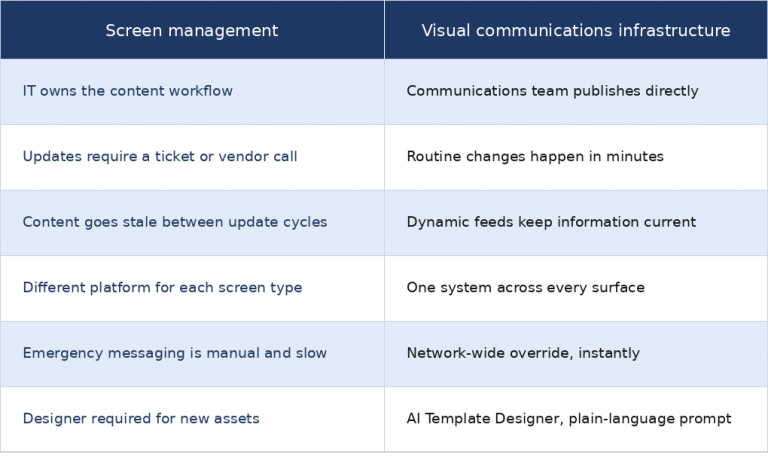
The organizations that have made the shift aren’t running a more complicated operation. They’re running a simpler one — fewer vendors, fewer logins, fewer handoffs between teams. The visual environment functions as a channel because it’s built on the same infrastructure as every other communications channel: owned, managed, and controlled by the people responsible for what it says.
What "Running It Like a Channel" Actually Means
The shift from screen management to communications infrastructure isn’t theoretical. The organizations that have made it are running environments most communications teams would recognize as more demanding than their own — higher volume, higher stakes, less margin for a screen running the wrong content at the wrong moment.
Here are some enterprises that mastered their communications infrastructure.
Rocket Mortgage Field House / Cleveland Cavaliers
On a game night, Rocket Mortgage Field House is managing day-to-day wayfinding for tens of thousands of people while keeping safety messaging ready to override every screen in the building instantly if it needs to. Those aren’t two separate systems with two separate teams. They run on the same platform, managed from the same place.
The platform handles both day-to-day wayfinding and emergency safety messaging without friction between them, and mobile wayfinding extends the experience past the physical kiosks to guests on their phones. One platform, one operating model, one team in control.
Tampa International Airport / Sky Center One
Sky Center One and Tampa International run a workplace communications environment and a high-volume public transportation environment on the same platform. The visual layer for an enterprise office and the visual layer for an airport terminal hold different audiences, different content cadences, and different operational requirements, but it is all managed as one system.
That’s the clearest proof point for what communications infrastructure actually enables at scale: not just faster content updates, but the organizational confidence to run genuinely different communications needs from a single platform without building a separate stack for each one.
Two Environments, One Operating Model: The Infrastructure Question.
The shift requires a platform underneath it, not a feature on top of something else.
Here is where most organizations stall. The case for running the visual environment as a communications channel is clear enough. The operational model makes sense. The proof exists. The obstacle isn’t conviction, it’s the stack underneath.
The typical enterprise visual environment looks something like this: signage from one vendor, wayfinding from another, room booking panels from a third, emergency messaging from a fourth. Each has its own contract renewal cycle. Each has its own training requirement. Each has its own update workflow, its own support line, its own implementation timeline when something needs to change. The fragmentation is the reason content goes stale. It’s the reason safety messaging is slow. It’s the reason the communications team has no real control — there is no single place to exercise it.
This is the infrastructure problem that prevents the operating model from working. You can hire the right communications team, invest in the right content strategy, build the right editorial calendar, but still find that executing against it requires coordinating across four vendors, four logins, and four systems that weren’t designed to work together.
The platform consolidation argument isn’t about simplicity for its own sake. It’s about what becomes possible when the visual environment runs on one system:
- Content scheduling that spans every screen type.
- Emergency override that reaches every building without manual intervention across separate platforms.
- Brand-locked templates that apply network-wide, not just to the screens one vendor happens to manage.
- A single service team that owns the outcome, not four vendors pointing at each other when something doesn’t work.
That’s what 22Miles has been building for twenty years. DX Pro™ is one platform for digital signage, wayfinding, room booking, video walls, and emergency communications, deployed cloud, on-premise, or hybrid. The organizations running it aren’t managing a simpler version of the fragmented stack. They’ve replaced the stack.
This is the infrastructure model the 22Miles team brought to InfoComm 2026, and the conversations on the show floor confirmed what the deployments already showed. Enterprise organizations aren’t asking whether the visual environment should function as a communications channel. They’re asking what it takes to run it that way. The answer, consistently, is the platform underneath.
Where Organizations Get Stuck
Most enterprise communications leaders aren’t unaware of the problem. They know the screens are running stale content. They know the update workflow is broken. They know the visual environment isn’t functioning as a channel. What’s less clear is why? And the answer is almost always one of three patterns.
IT Owns the Screens. Comms Doesn’t Have Access.
This is the most common one. The screens were installed as an IT project, with an IT budget and IT ownership. The communications team inherited a channel they don’t control. Every content request goes through a ticket queue. Routine updates like swapping a campaign asset, pushing an event listing, or correcting a directory entry require either an IT resource or a vendor call. The result is a backlog that makes the channel functionally unusable for anything time-sensitive.
The fix isn’t a workflow conversation between IT and comms. It’s a platform that gives the communications team direct publishing access without putting the burden of system management on them. The screens stay on IT’s infrastructure. The content becomes the communications team’s responsibility, with the tooling to match.
Multiple Systems for Different Screen Types.
The lobby kiosk runs on one platform. The conference room panels run on another. The video wall in the atrium has its own system and its own vendor. Each was purchased separately, justified separately, and implemented separately. Nobody designed a unified campaign layer across all of them because there wasn’t one to design.
This is where the communications infrastructure argument becomes concrete. A campaign launch that needs to hit every surface — lobby directories, hallway signage, room booking panels, the video wall — requires coordinating across every system separately. There’s no network-wide scheduling. There’s no single brand-locked template set. There’s no unified emergency override. The fragmentation isn’t just an IT overhead problem. It’s a communications capability problem.
Emergency Communications Aren’t Integrated.
Safety messaging and operational alerts sit in a separate system from daily content. When something needs to go network-wide, like a building evacuation, a severe weather alert, or a safety drill, it requires manual intervention across multiple platforms. The screens that run daily signage content don’t automatically receive the emergency override. Someone has to log into each system and push the message manually.
This is the highest-stakes version of the fragmented stack problem. Every second between the event and the message reaching every screen is a failure of the infrastructure layer — not the communications team. The organizations that have resolved it aren’t running faster manual processes. They’ve moved to a platform where the emergency override is a single action, network-wide, and the daily content and the safety messaging run on the same system.
The Visual Environment Doesn't Manage Itself.
The organizations running the visual environment as a communications channel made one foundational decision before anything else: they stopped treating it as infrastructure and started treating it as a channel. That decision changes everything downstream — who owns the content, how fast it moves, whether emergency messaging reaches every screen in seconds or every screen eventually.
The platform underneath that decision is DX Pro™. One system for digital signage, wayfinding, room booking, video walls, and network-wide emergency communications. Cloud, on-premise, or hybrid. The communications team controls what runs on the screens. IT manages the platform. The content stays current. The channel works.
If the visual environment across your organization is still running the way infrastructure runs — slowly, reactively, owned by the wrong team — the gap between where it is and where it needs to be is a platform decision, not a process one.